
How to Create a MulaEarn Account
After clicking the MulaEarn registration link, you will see the account registration page.
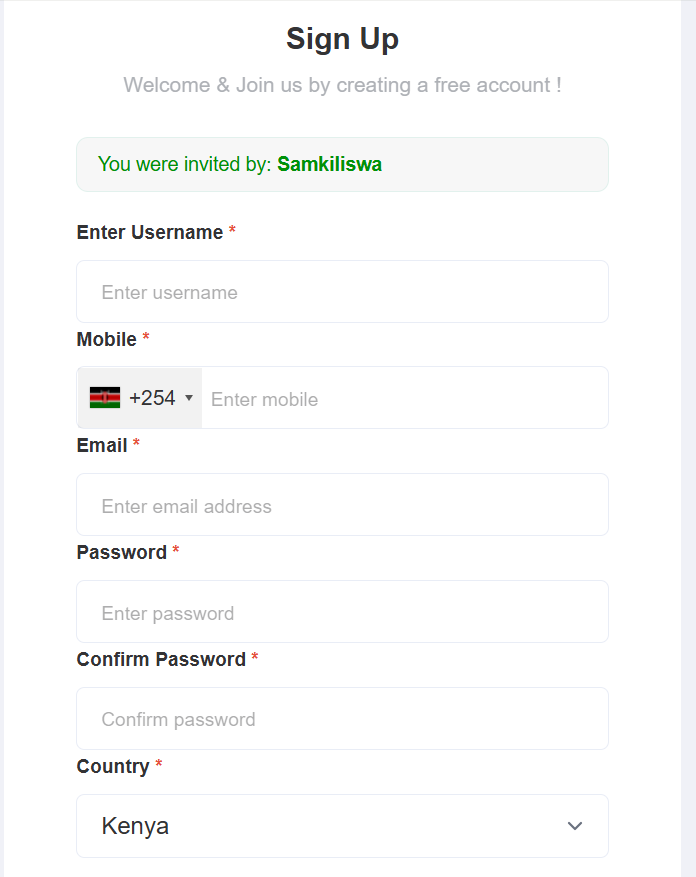
Step 1: Enter Your Username
Choose a unique username that you can easily remember.
Example: samkiliswa
Note: Your username will be used whenever you log in to your MulaEarn account, so choose one you won’t forget.
Step 2: Enter Your Mobile Number
First, select your country code, then enter your phone number without the country code.
Example:
794800571114688883
Only enter the number starting with 7 or 1, depending on your mobile network.
Step 3: Enter Your Email Address
Provide a valid email address and double-check that it is correct.
Your email will be used to:
- Reset your password if you forget it.
- Receive important MulaEarn notifications and updates.
Step 4: Create a Password
Create a strong password with at least 4 characters using letters, numbers, or a combination of both.
Example: 432G
Choose a password you can remember but that is difficult for others to guess.
Step 5: Confirm Your Password
Re-enter the same password to confirm it.
Step 6: Verify Your Country
Your country will be selected automatically after you enter your mobile number. Confirm that it is correct before continuing.
Step 7: Create Your Account
Click the Create Account button to complete your registration and proceed to the next page.
Step 8: Activate Your MulaEarn Account
After creating your account, you will see the account activation instructions. Follow the steps provided to activate your MulaEarn account successfully.
Once your account has been activated, you can log in to your MulaEarn Dashboard, where you’ll be able to access available tasks, manage your account, and start earning.
MulaEarn – Download MulaEarn App – MulaEarn


Pingback: MulaEarn - MulaEarn